After 0.1
0.2 · Reaching furtherThe channels and doors beyond the four personal surfaces.
- In designHer own WhatsApp number, one per assistant
- In designThe phone as a front door
- Up nextNotifications in the browser
- Up nextAirmond for Android
- In designAirmond in Slack and Teams
- In designThe character designer: dials for initiative, brevity, warmth, directness
- Up nextA separate rehearsal environment
- Up nextThe 7-day trial, properly
LaterDirections we are committed to, not yet scheduled.
- In designShe works on your Mac with you watching
- In designSpecialists you can bring on
- In designYour assistant talks to theirs
Still to build for 0.1 — 21 items
- Rolling out
A visible plan for big asks
EverywhereGive her something large and she breaks it into steps you can see, asks her questions up front, and starts what she already can.
- Rolling out
Answers that arrive after you hang up
EverywhereWhen a lookup takes longer than the call, the answer still finds you: spoken if you are on a call, in Messages if not, by email when she said she would email it.
- Rolling out
The same tabs in the same order, everywhere
iPhoneiPadMacMessages, Meetings, Tasks, Knowledge. iPhone, iPad and Mac stop disagreeing.
- Rolling out
She always knows what she can and cannot do
EverywhereOne honest list of her abilities, per surface, that she can never contradict. No more promising what she cannot see, or denying what she can.
- In testing
Mac updates that actually arrive
MacThe Mac app updates itself again, same day as a release.
- In testing
Airmond on the App Store
iPhoneiPadTestFlight today; the store listing is in review.
- Up next
Meetings on the web
WebThe list, the detail and the near-live transcript, on airmond.com like on your phone.
- Up next
Live captures reach every screen
iPhoneiPadMacWebWhat she writes down mid-meeting shows up on your phone, iPad and Mac as it happens, not only on her tile.
- Up next
The debrief after every meeting
EverywhereSummary, decisions, her takeaways and proposed tasks. Nothing you already have reappears; nothing already done is proposed again.
- Up next
Task suggestions from your world
Everywhere - Up next
Knowledge grouped into areas with icons
Everywhere - Up next
A real sense of time
Everywhere“Send me a message at 2:30”, “call me in three hours”, “every morning at six, call me with my briefing.” She holds a timed errand until its time instead of finishing it early.
- Up next
See what she is reading
WebiPhoneiPadSettings shows what she has read from your calendar and inbox, when, and what she learned.
- Up next
Sign up with Google or Microsoft
WebOne tap in, and connecting your accounts happens in the same motion.
- Up next
Introduce her to someone
EverywhereGive her the number or email of someone curious, and she calls them, introduces herself honestly, and answers what she can and cannot do, herself.
- Up next
She introduces herself correctly on every phone
EverywhereA call from a shared number no longer wears another assistant's name.
- Up next
What's new, inside the app
iPhoneiPadMacThe first open after an update tells you what changed. This page is where it reads from.
- Up next
Ask for what she cannot do yet
EverywhereShe takes the request, captures how you wanted it to work, and tells you personally the day it ships.
- Up next
Everything she does is a link
EverywhereA call opens into its transcript (and, for our team, its recording). A message shows sent, delivered and read. Every fact shows where it came from and when it changed. History holds all of it.
- In design
Record the room from the web
Web - In design
The Mac app at full strength
MacRecord a room, send photos and voice notes, browse People and Things, see Meetings.
Building now
October 22, 2026
Someone you mention once becomes someone she knows
EverywhereA name said in passing lands in People, not only inside a task title.
Mid-call, she can write down belongings and facts, not only to-dos
EverywhereThe last wire for late answers
EverywhereOne lane for “I'll look into it”, so a promise made on a call is a promise the system keeps.
This page
WebA living changelog, and one honest list of what Airmond is.
Oct 16, 2026
- Improved
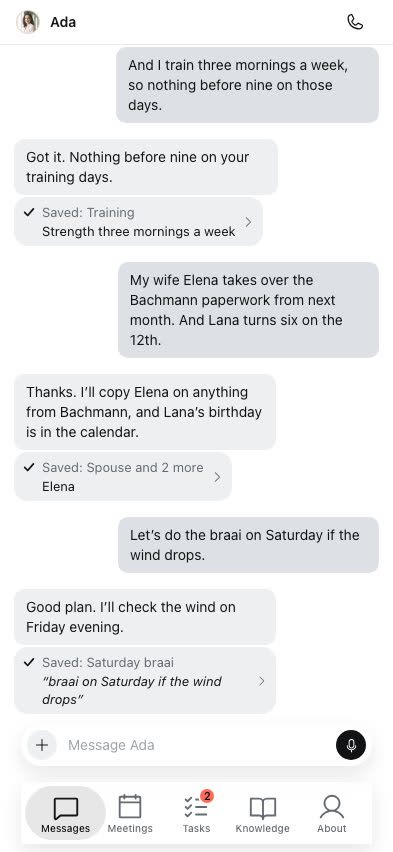
What she remembers is more accurate
Everywhere“Saved to Knowledge” only claims what that message taught her, saying something again confirms a fact instead of rewriting it, a missed meeting is learned from on a retry, and she never keeps a password or a PIN.
Built by Joe
- Improved
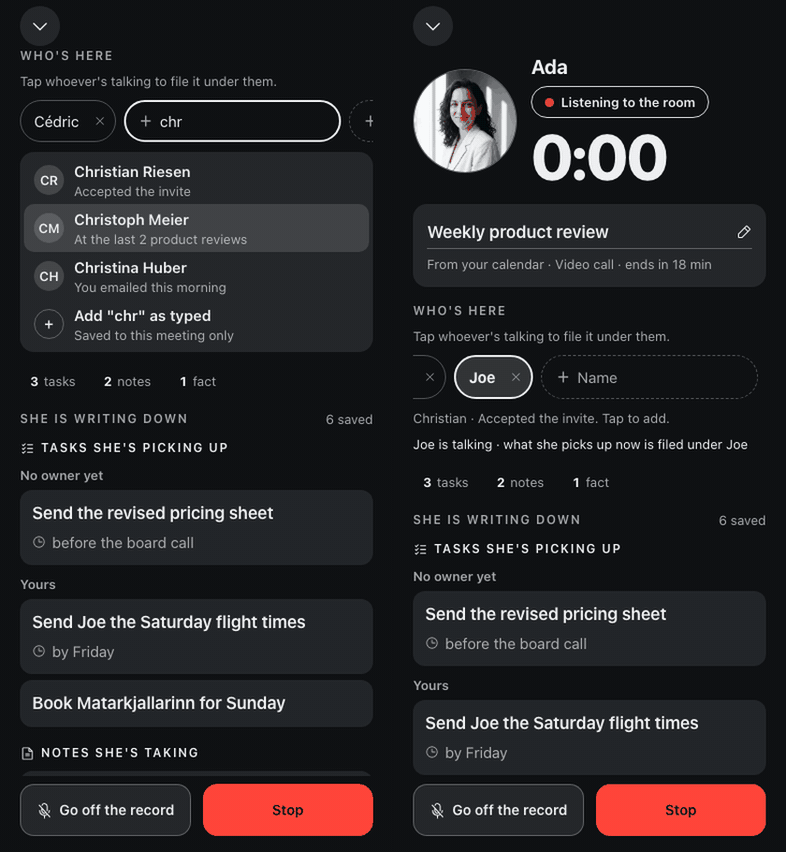
Recording the room knows which meeting it is
iPhoneiPadAndroidIt suggests who is there, captures a call on speaker in the same room, and the strip says Processing, then Notes ready.
Built by Cédric
- Improved
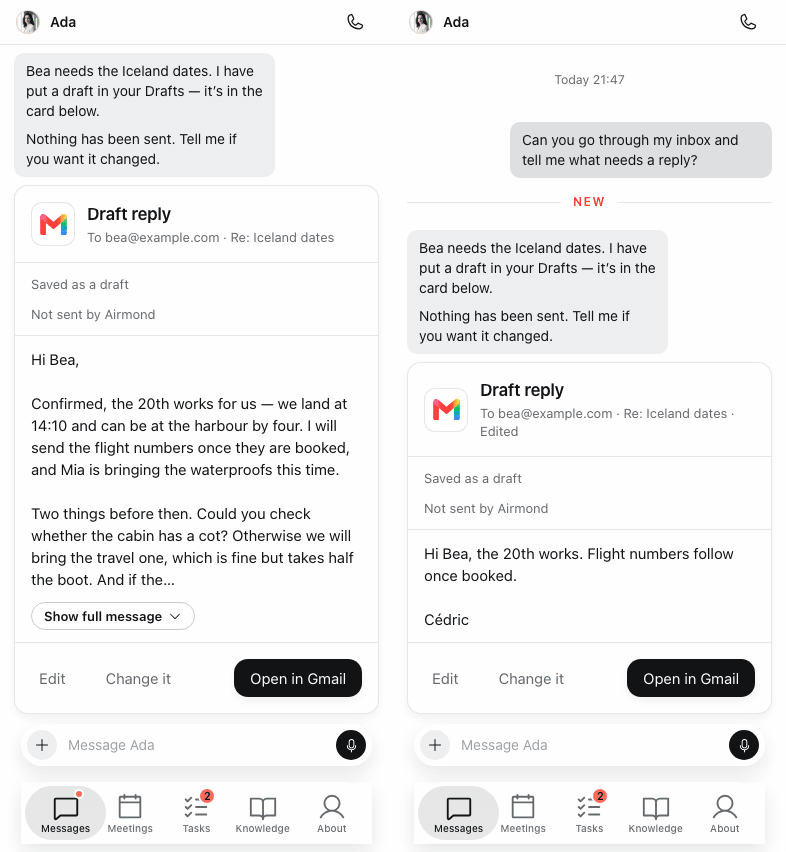
Draft cards you can edit in place
iPhoneiPadAndroidWebMacEach draft shows the app it is for, opens in full, takes your edits right on the card, and Open takes you to that exact draft.
Built by Cédric
Oct 15, 2026
- New
Ask her to remind you, and she does
Everywhere“Remind me tomorrow at 7:30 to take the key”, in chat or on a call, and her message arrives at that minute, early mornings included. Repeating reminders come next.
Built by Ákos & Cédric
- New
She emails people from her own address, once you say send
EverywhereAsk her to email someone and you see the exact sender, recipients, subject and message first; nothing leaves until you tap Send, on a call too.
Built by Balázs
- New
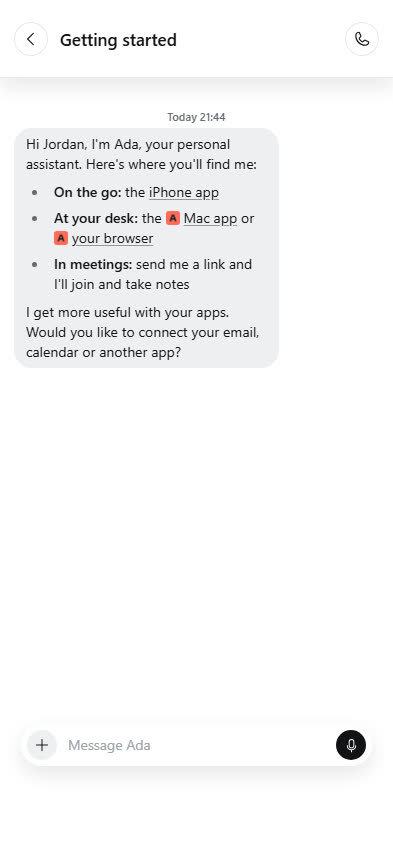
A Getting started conversation for every new member
iPhoneiPadAndroidWebMacHer welcome points to the web and Mac apps and to meetings, and once you connect an app she follows up with what she can now do.
Built by Balázs
- Improved
WhatsApp feels like WhatsApp
WhatsAppiPhoneiPadAndroidWebBlue ticks and “typing…” the moment your message lands, she sees your reactions, quoted replies and shared locations, and she can offer WhatsApp as a card in chat.
Built by Joe
- New
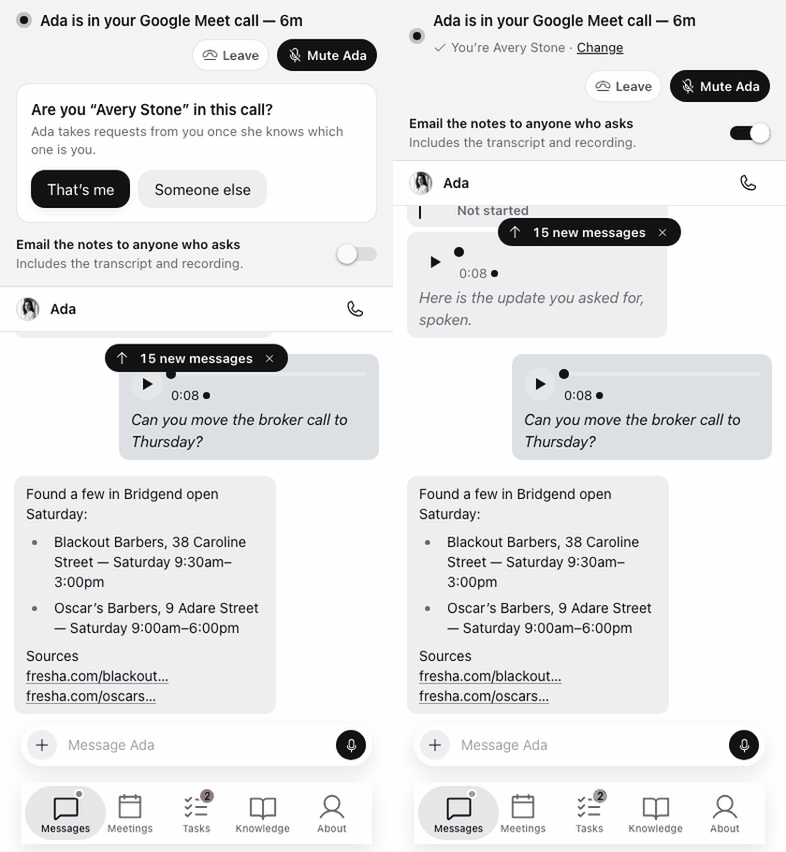
Share a meeting's notes with whoever asks
EverywhereOne switch per meeting, and she emails the summary from her own address to the people who asked for it.
Built by Ákos
- New
Ask for a file from any app you connected
EverywhereShe searches and opens files from Drive, your mail, Slack and Missive, and offers to connect the app when it is missing.
Built by Balázs
- Improved
On a call she places, she waits for your hello
EverywhereShe no longer talks over the pickup, and a first call gets to know you before it ends.
Built by Ákos
- Fixed
Signing in works the first time
iPhoneiPadAndroidWebContinue with Google finishes on the web, Google sign-in is native on iPhone and Android, and an email link waits for your tap so a mail scanner cannot use it up.
Built by Ákos
Oct 14, 2026
- Fixed
Every errand report arrives, in your language
EverywhereA call she placed for you is always reported, against what you actually asked for, even by voice, and in the language you speak with her.
Built by Ákos & Cédric
- Improved
Reply or reply all, on purpose
EverywhereThe draft card names who it goes to, who is on copy and who is left off, and it is signed by whoever owns the mailbox.
Built by Balázs
- Fixed
She knows where your meeting is
EverywhereAsk about an event and she tells you its place and gives you its join link.
Built by Balázs
- New
She can find and open any past conversation
EverywhereOn a call or in chat, “what did we say about the trip?” works, and her reply says which conversation it came from.
Built by Ákos & Cédric
- Improved
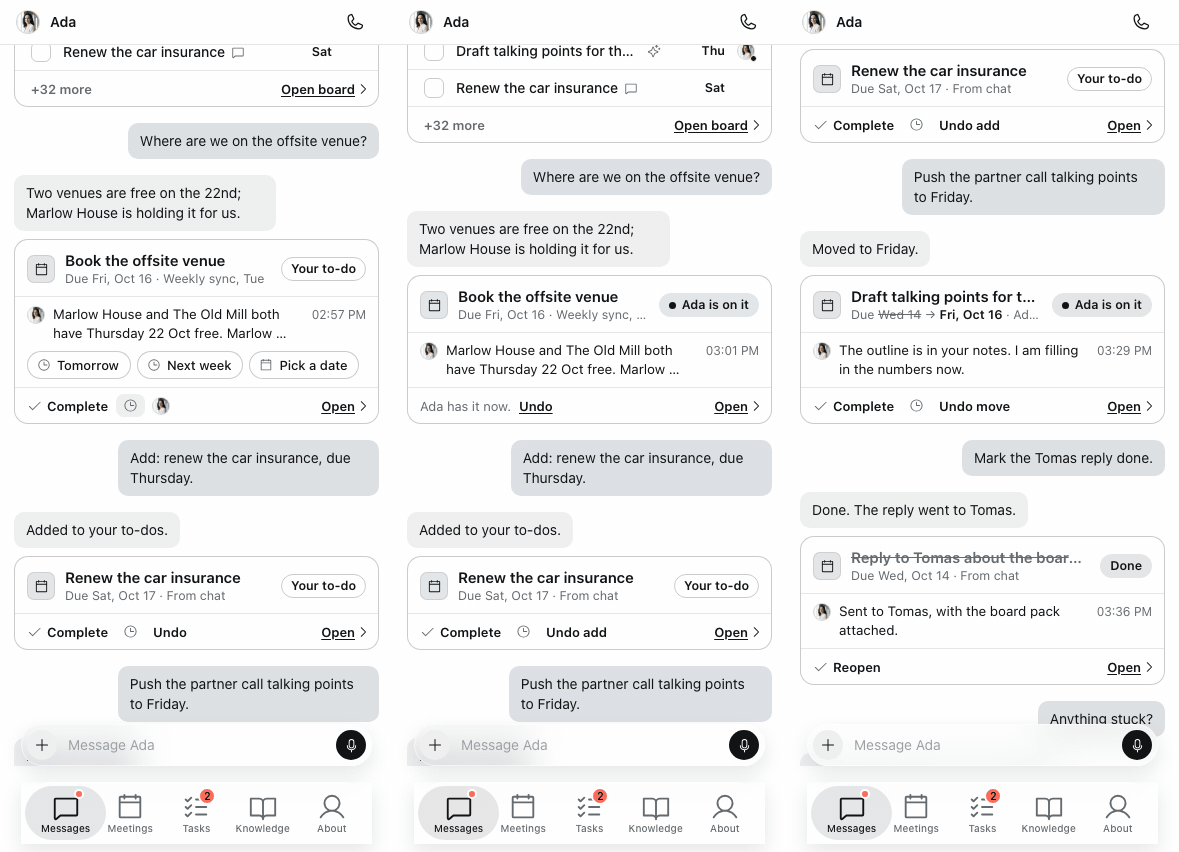
Task cards you can act on
iPhoneiPadAndroidWebMacPick a date, hand it to her with “take this”, undo anything, and see the meeting a task came from.
Built by Cédric
- New
Invite a friend with your own link
iPhoneiPadAndroidWebMacYour link names you as the one who invited them, and she tells you when your friend joins.
Built by Cédric
- New
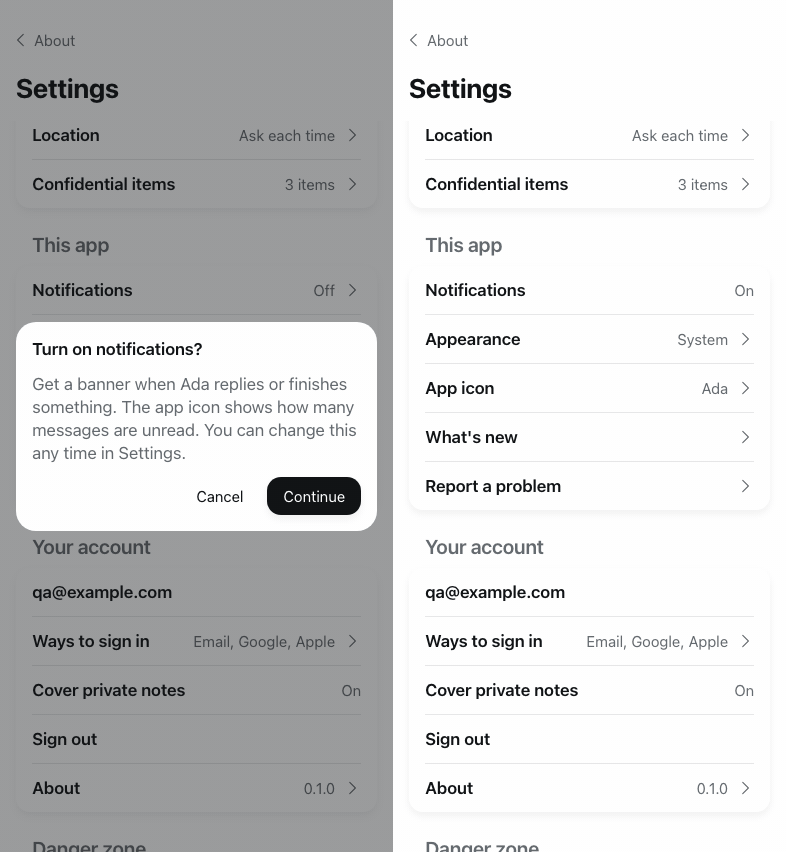
Notifications and a badge on the new app
iPhoneiPadAirmond asks once, at a calm moment, then what needs you reaches your lock screen, with a count on the icon.
Built by Cédric
Oct 13, 2026
- New
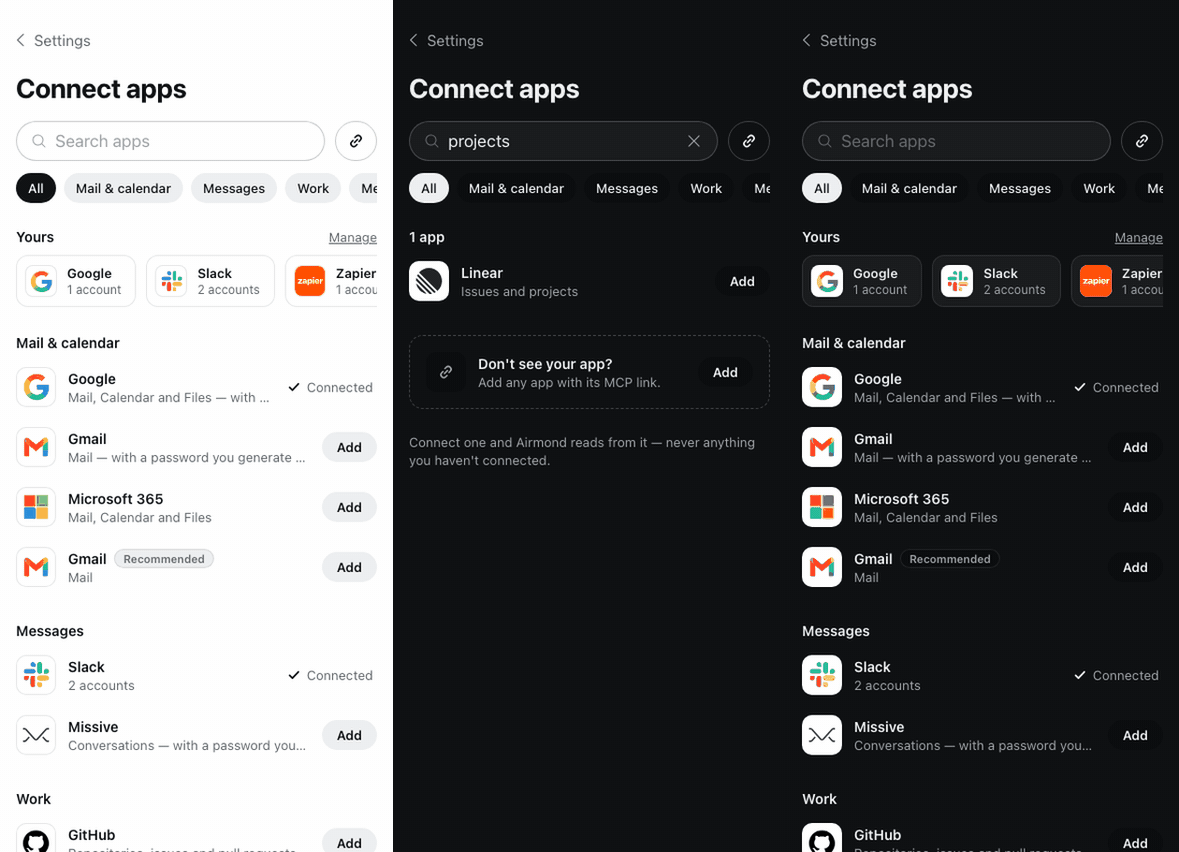
Connections, laid out like a store
iPhoneiPadAndroidWebMacEvery app she can use, with its own logo and what it covers, new ones such as ePost, Zapier and Beyond Tickets, and a connect card in chat that follows your sign-in so she carries on.
Built by Cédric & Balázs
- Improved
A call started in a conversation stays in it
iPhoneiPadAndroidWebMacPress Call with a conversation open and the call, its card and its summary land right there.
Built by Ákos
- New
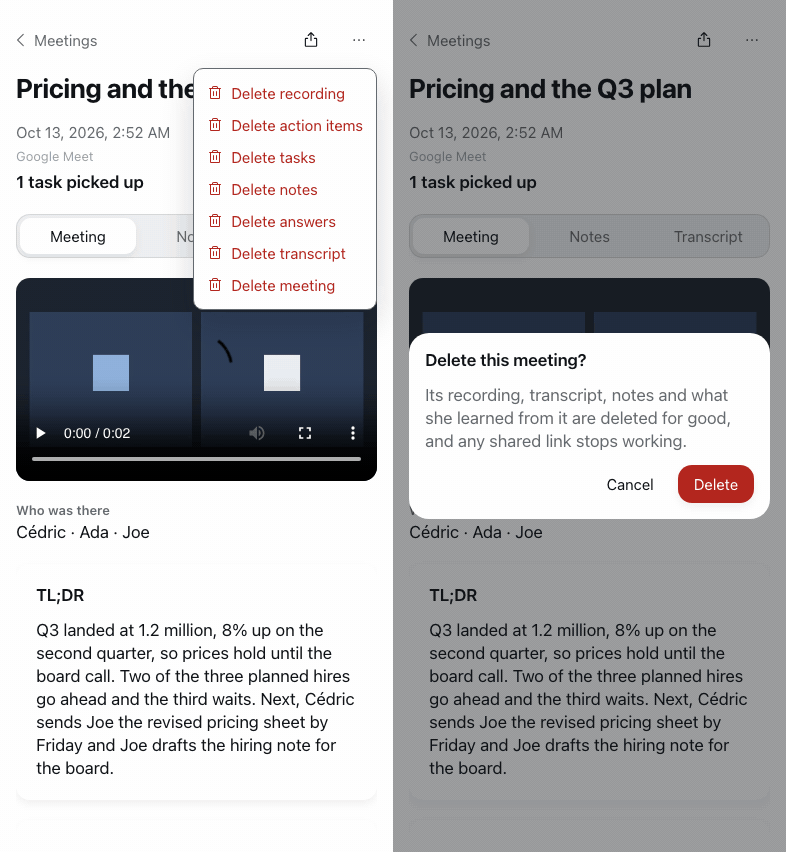
Delete part of a meeting, or all of it
iPhoneiPadAndroidWebMacThe meeting's menu removes the transcript, the recording or the notes for good, renames it, or deletes the whole meeting with every copy we hold.
Built by Ákos & Cédric
- Improved
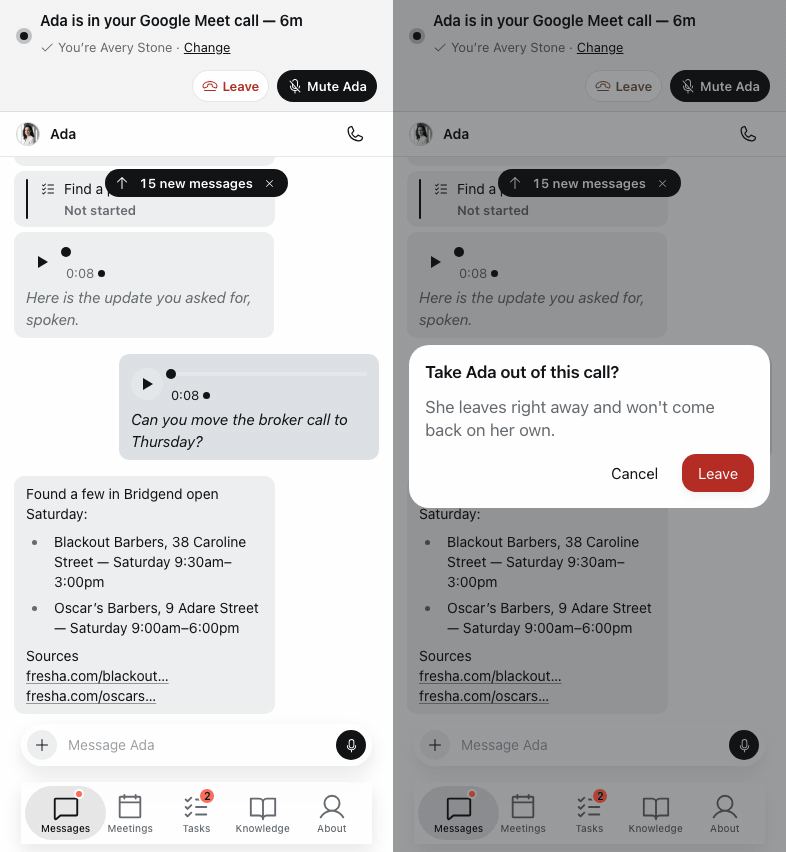
Take her out of a meeting from the live strip
EverywhereAnd she leaves on her own when only other bots are left in the call.
Built by Ákos
- Improved
The Mac app is the full app, and stays current
MacThe Mac window now runs the same app as app.airmond.com, Settings live inside it, and it checks for updates every fifteen minutes.
Built by Cédric
Oct 12, 2026
- Improved
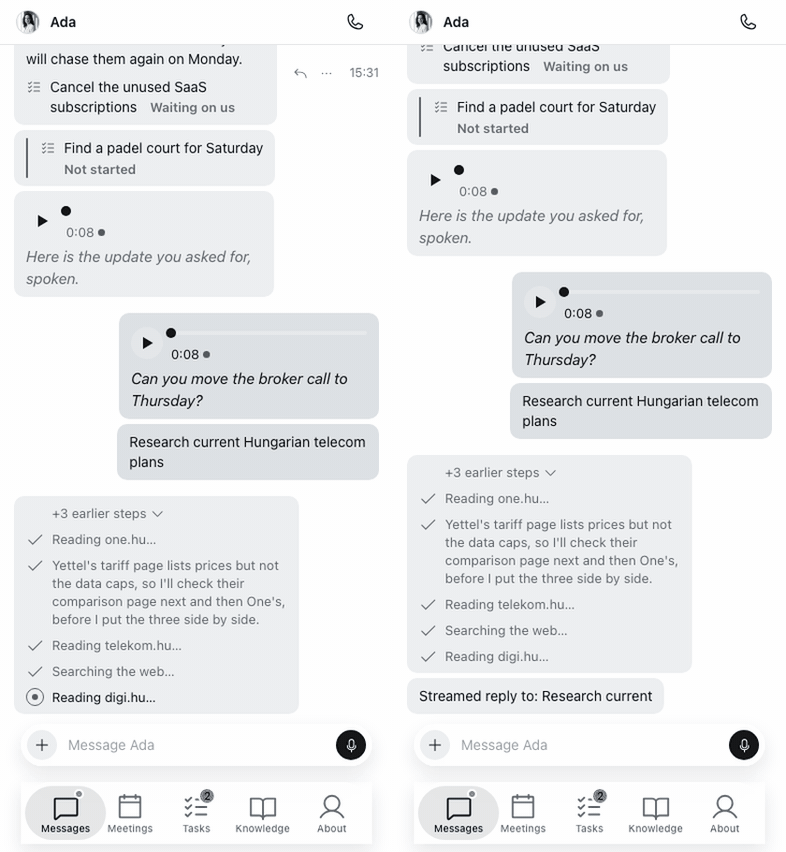
Watch her research while she works
iPhoneiPadAndroidWebMacEach search shows as a step with what she searched for, you see which page she is reading, and a long look-up always ends with what she found.
Built by Ákos
- Improved
Every voice call is one card
iPhoneiPadAndroidWebMacWhen it was, how long, her summary and the transcript on a tap, and after the call she never repeats what she already said.
Built by Ákos
- New
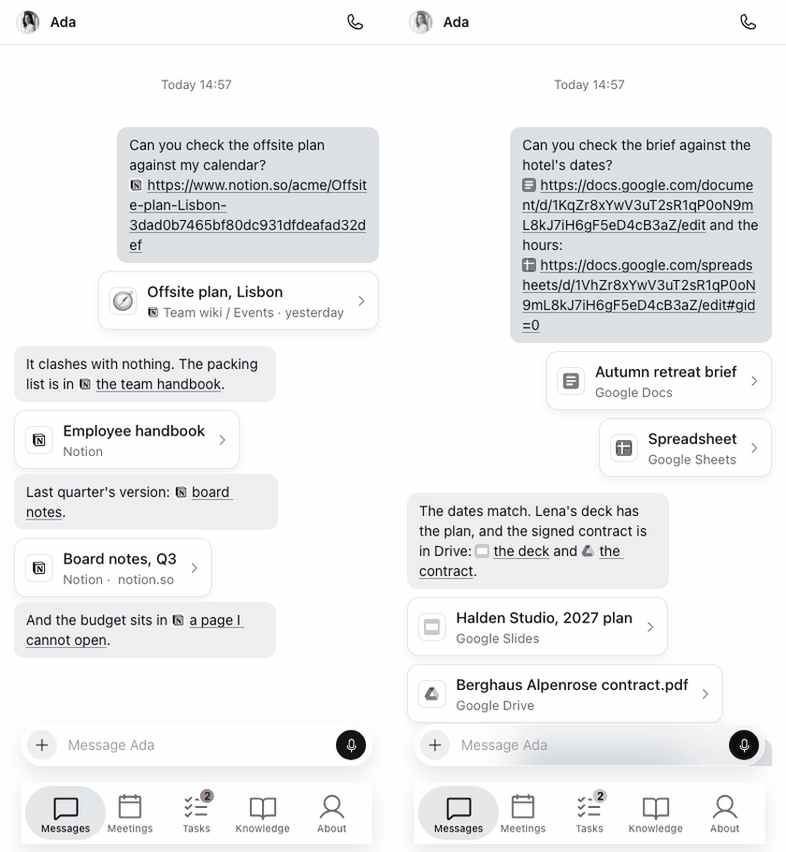
Links show what they are
iPhoneiPadAndroidWebMacA link draws a card with the site's icon and title: YouTube and Spotify play in place on the web, a map for a place, live state for a GitHub pull request, and the page or message behind a Notion or Slack link.
Built by Cédric
- Improved
Look-ups just run, and Always means always
iPhoneiPadAndroidWebMacReading from a connected app never asks, and a change she wants to make offers No, Always or Approve, with the app's logo on the card.
Built by Balázs
Oct 11, 2026
- New
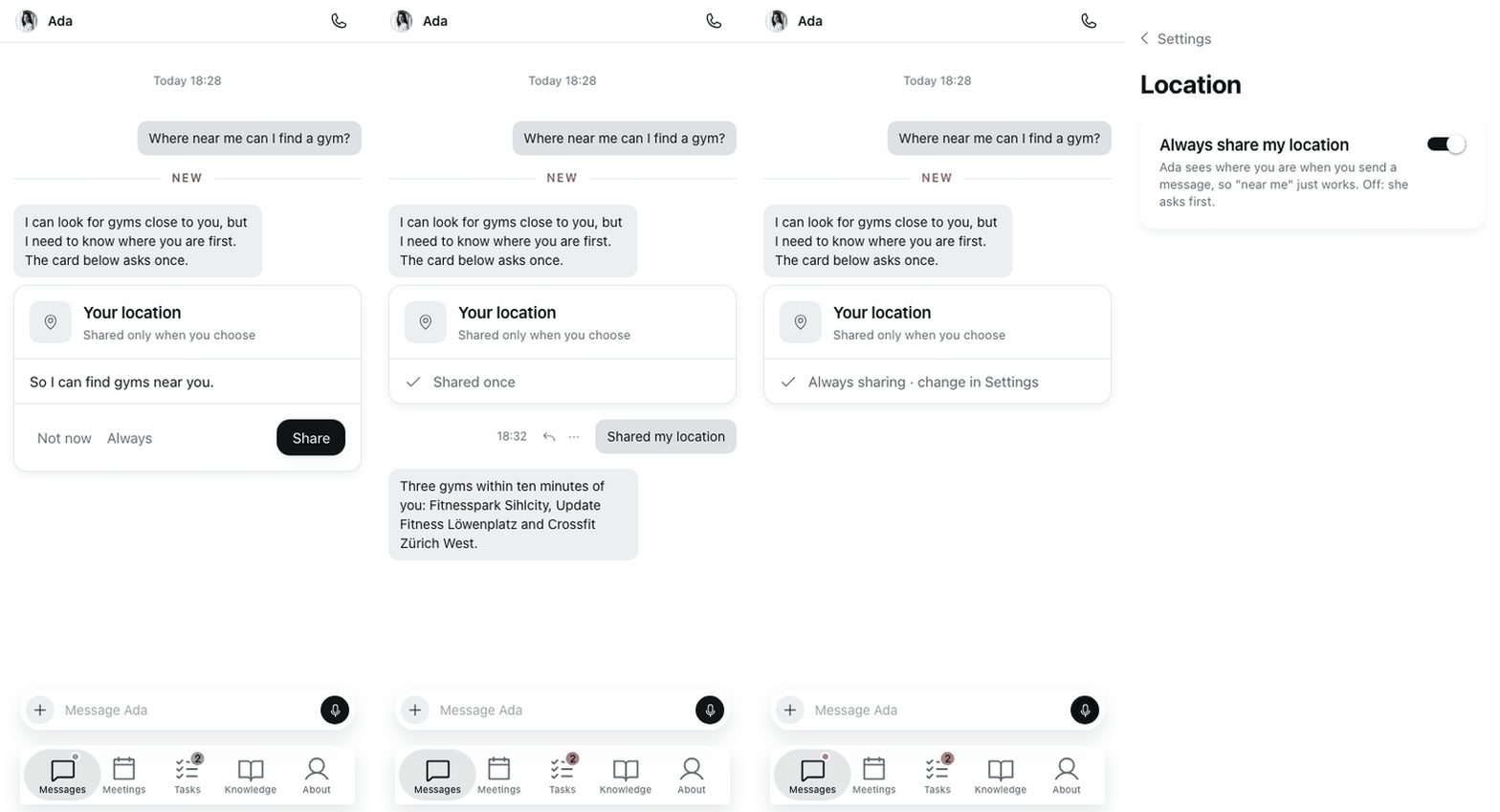
Ask what's near you
iPhoneiPadAndroidWhatsAppShare where you are once or always, from the app or a WhatsApp pin, and “near me” answers from there. Your location is never saved.
Built by Cédric & Joe
- Improved
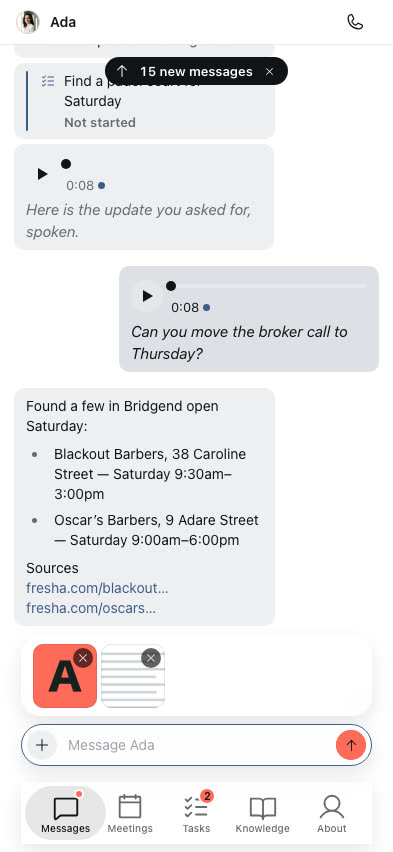
Paste or drag a file into the conversation
WebMaciPhoneiPadAndroidA copied screenshot or file attaches when you paste it, and on the web you can drop files straight in.
Built by Ákos & Balázs
Oct 10, 2026
- New
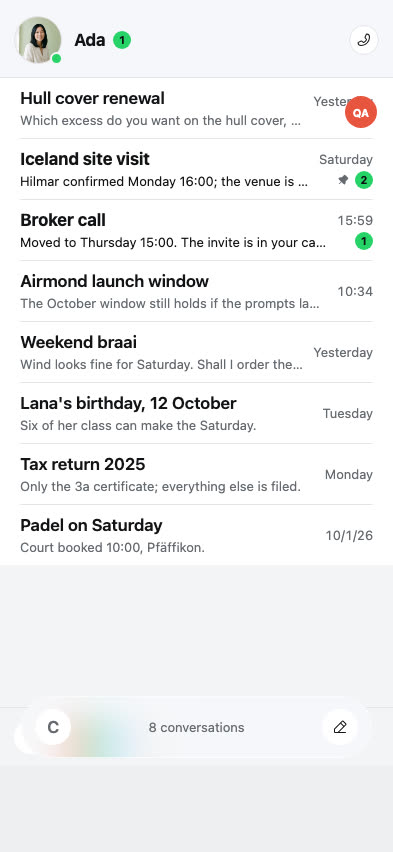
One app called Airmond, with your conversations in one list
iPhoneiPadAndroidWebMacKeep separate conversations with her, pin, archive or mark them unread, find one by its title or a message in it, and each new one names itself.
Built by Ákos & Cédric
- Improved
A calmer look, with a little motion
iPhoneiPadAndroidWebMacA quieter palette across the apps, the site and her emails, and small moments of movement when you send, when she answers and when something is saved.
Built by Cédric
Sep 25, 2026
- New
Confidential details she only reads with your say-so
iPhoneiPadAndroidWebKeep a passport number or a PIN where she must ask first; you allow it with Face ID or Touch ID, see every use, and the value shows only on the card. In early trial.
Built by Cédric
- New
Link your WhatsApp from Settings
iPhoneiPadAndroidWebWith a code or straight from the app, no dead ends.
Built by Joe
Sep 24, 2026
- New
Ask her about your inbox
Everywhere“What are my last few emails?”, “anything in my inbox?” and “sort my inbox” all work, and what needs you arrives as one tidy card.
Built by Joe
- New
She can work a browser on your computer, and you can watch
iPhoneiPadAndroidWebMacGive her a task on your machine, watch the screen live, jump in when she hits a sign-in, and hand it back so she carries on. In early trial.
Built by Cédric
- Improved
The Waiting on you widget shows her face
iPhoneA tidier layout with a count of what else is waiting.
Built by Cédric
Sep 23, 2026
- Improved
Replies appear as she writes them
iPhoneiPadAndroidWebSimple messages get an instant answer, and when she goes to use a tool a short “on it” shows straight away.
Built by Joe
- New
She asks you mid-call, and waits for your answer
iPhoneiPadMacWebWhen the other side needs a decision, she asks you in the chat, and says so honestly when she cannot wait any longer.
Built by Ákos
- Improved
She takes on the harder calls
EverywherePhone menus, airlines, contracts and negotiations are placed instead of declined, she presses the right keys, remembers numbers she has used and opens in the right language.
Built by Ákos
- New
She writes your Slack messages for you to send
iPhoneiPadAndroidWebA review-only card with Copy and open in Slack; she never posts, not as you and not as herself.
Built by Cédric
Sep 22, 2026
- New
Listen in, take over, or steer her mid-call
iPhoneiPadMacWebHear the call, whisper her a private instruction she follows, or take the line yourself.
Built by Ákos
- New
She drafts your email replies in the thread
iPhoneiPadAndroidWeb“Draft a reply to that” gives you a card with who it is to and what she wrote, and “Change it” rewrites it. She never sends.
Built by Joe
- Improved
The Mac updates itself quietly
MacUpdates download in the background and “Update ready” offers the restart; notifications reach release builds.
Built by Cédric
Sep 21, 2026
- New
She asks for access right in the thread
iPhoneiPadAndroidWebA card to connect Google, a secure form for a Gmail app password, and a card to allow her to read your messages, each staying as the record.
Built by Joe
- New
Switch whole bundles of what she knows on or off
iPhoneiPadAndroidWebKnowledge brought in from your existing notes arrives as modules you can pause or remove, and each room says how many questions are still open.
Built by Cédric
Sep 19, 2026
- New
Follow the calls she makes for you, live
iPhoneiPadMacWebA card appears the moment she says she is calling, names who she is talking to, and shows the conversation as it happens, on the phone and the Mac.
Built by Ákos & Cédric
Sep 18, 2026
- Fixed
The app opens on iOS 27
iPhoneiPadA launch change iOS 27 requires, fixed before members updated.
Built by Cédric
- Fixed
She reports every call truthfully
EverywhereA number that never connected is no longer called reached, the report lands in your chat, and she answers “did you reach them?” from the right call.
Built by Joe & Ákos
- Improved
Your own to-dos stay yours
EverywherePersonal reminders sit apart from her work, and a quick chat request no longer turns into a background task.
Built by Ákos
Sep 17, 2026
- Improved
The new voice joins your meetings
EverywhereShe stays quiet unless someone is really talking to her, checks it is you before acting on your account, and can leave the call when asked.
Built by Ákos
- New
She looks things up, and shows her sources
EverywhereShe says what she is about to look into, then answers with sources you can tap.
Built by Joe
- New
She tells the team what she could not do
AdminWhen something is beyond her, she writes it down for us instead of letting it vanish.
Built by Cédric
Sep 16, 2026
- Improved
Voice notes: slide to lock, and see them being written out
iPhoneiPadAndroidA long note no longer means holding the button, and the note says when it is transcribing and can be read afterwards.
Built by Cédric
- Improved
airmond.com hands members to the app on the web
WebEvery old member link opens the new app at app.airmond.com, and sign-in mail comes from her.
Built by Joe
- New
Report a problem on any message
iPhoneiPadAndroidWebLong-press a reply that went wrong and tell us, right there.
Built by Cédric
Sep 15, 2026
- Improved
A returning member gets the assistant they already knew
EverywhereAnd the team can give a member a specific assistant, name and face.
Built by Cédric
Sep 14, 2026
- Improved
A new voice, everywhere she speaks
EverywhereTalking to her on airmond.com, in the app and on the phone, incoming and outgoing, now runs on a faster, more natural voice.
Built by Ákos
- Improved
The thread reads like a document
iPhoneiPadMacWebLong answers render as documents with bold and italics, a divider marks where you stopped, and quotes take you back to the message.
Built by Cédric
Sep 13, 2026
- New
See every skill she has
iPhoneiPadAndroidWebSettings › Skills lists what she can do, what is still planned, and how each one works.
Built by Cédric
Sep 10, 2026
- Improved
Tasks: needs you, on it, done this week
iPhoneiPadAndroidWebHer own small steps no longer clutter the board, and the documents she wrote open from the task card.
Built by Joe
Sep 9, 2026
- New
Voice Lab: rehearse, compare and release her voice
AdminThe team can try a voice setup against real scenarios and meetings per channel, compare runs turn by turn, and promote the winner or roll it back.
Built by Ákos & Joe
- Improved
A warmer first call
EverywhereBooking by part of the day, even from the waiting screen, no quiet-hours interrogation, WhatsApp verified during the call, and a follow-up email written as a letter from her.
Built by Joe
- Fixed
Sign out and Delete account work on the web
WebAdminAnd deleting an account now really deletes it.
Built by Joe
Sep 8, 2026
- New
An Airmond widget for your home screen
iPhoneShe sits on your iPhone home screen, and the app opens for someone who has never signed in.
Built by Cédric
- Improved
Swiss members get a Swiss number
EverywhereShe calls from a local line in Switzerland; everyone else keeps the US one.
Built by Joe
- New
An evals console for the team
AdminEvery test run of her calls and every verdict is kept and readable in the admin panel.
Built by Joe
Sep 7, 2026
- Improved
In a meeting she admits when something did not work
EverywhereNo more pretend success, better turn-taking, and she recognises names said in the room faster.
Built by Ákos
- Improved
She rings you back with what the errand call produced
EverywhereAnd she tells you truthfully whether anyone picked up.
Built by Joe
- Fixed
On Android the composer rides the keyboard, and Back works
AndroidThe field stays visible while you type, and the back key closes screens again.
Built by Joe
Sep 6, 2026
- Improved
Sorting and drafting are two separate yeses
iPhoneiPadAndroidWebLet her sort your inbox without writing any drafts; “Draft replies for me” is its own switch.
Built by Cédric
- New
One timeline for every meeting, call and chat
AdminOur team can follow what happened in any conversation in one place.
Built by Ákos
Sep 5, 2026
- New
Bring her into Slack
EverywhereMessage her there and she answers under her own name and face, and she can read your Slack without ever posting as you.
Built by Cédric
- New
In a one-to-one meeting she can check your calendar and book
EverywhereFind a free slot and put it in, the same as on a phone call, and a meeting joined from a call gets her live, not a silent recorder.
Built by Ákos
- Improved
Lower the call screen and keep talking
iPhoneiPadAndroidA strip brings you back to the call or a recording, and a call and a recording never listen at the same time.
Built by Cédric & Joe
- Improved
The meeting stage fills as the room talks
iPhoneiPadAndroidOn a phone too, with the transcript beside what she has noted, in thirty-second steps.
Built by Cédric
- New
Your home screen shows her face
iPhoneWebThe app icon becomes your own assistant, on iPhone and on the web.
Built by Cédric
Sep 4, 2026
- Fixed
She keeps your hours in your own time zone
EverywhereEvery member gets one at sign-up, and she no longer reads a UTC clock back as your working day.
Built by Joe & Ilya
Sep 3, 2026
- New
Sign up on airmond.com and land straight in the app
WebiPhoneAndroidName her, see her getting ready, and pick when she calls you in your own time zone.
Built by Joe
- New
Calls she places for you are recorded, and the other person is told
EverywhereListen back from the call itself; recording only happens when it was announced.
Built by Joe
Sep 2, 2026
- New
Sign in with Apple, Google or Microsoft
iPhoneiPadAndroidWebOr with a code by email, and Settings lists every way you can sign in.
Built by Cédric
- Improved
A new airmond.com
WebA film of her at work, a sign-up card that stays in view on a phone, and one honest promise about when she first calls.
Built by Cédric
Sep 1, 2026
- New
She sorts your inbox and drafts the replies
EverywhereAsk her to start, and every fifteen minutes she separates what needs you from spam, writes drafts in your voice as cards you can open, never sends, and tells you on WhatsApp.
Built by Joe & Cédric
- New
Let her read the mail other people send you, if you choose
EverywhereOff by default, one switch in Settings, for Gmail, Microsoft and app-password inboxes, and she can open a specific email when you ask.
Built by Ilya & Cédric
- New
Hold to record a voice message, and hear hers
iPhoneiPadAndroidWebRelease to send, and voice bubbles you can scrub through, in both directions.
Built by Cédric
- New
Messages link to the facts and tasks they mention
iPhoneiPadAndroidWebA chip on the bubble opens the fact or task behind it, and each link points the right way.
Built by Cédric
Aug 31, 2026
- New
She works inside Microsoft 365
EverywhereShe can leave a draft in your Outlook, put something in your calendar, and file into her own folder in your OneDrive.
Built by Ilya
- New
Airmond One: one app on iPhone, iPad, Android and the web
iPhoneiPadAndroidWebMessages, Meetings, Tasks and Knowledge in a single app, with recording, attachments and a What's New screen, at app.airmond.com too.
Built by Cédric
- Fixed
Chatting on the web works again
WebThe conversation reconnects properly, and a message typed while she is connecting is no longer lost.
Built by Ilya
Aug 29, 2026
- New
Connect Gmail with an app password
WebiPhoneiPadAndroidNo Google consent screen to wait on; the tile says when she last read and lets you disconnect.
Built by Ilya & Joe
- Improved
The Mac catches up with the phone
MacConnections, the Spellings room, adding to what she knows, sortable rosters, readable transcripts, Sign in with Apple, and a first screen that introduces her.
Built by Cédric
Aug 28, 2026
- New
Choose how fast she speaks
EverywhereA setting on the web, and every call after it keeps to the pace you picked.
Built by Ilya
- Improved
She never writes as you, and never claims to be human
EverywhereOn every channel you type on, not just the phone, and she only says she sent something where she actually did.
Built by Cédric
- Improved
Sign up and she gets ready without waiting for us
WebAdminYour assistant is set up on her own; a person still checks before the first call.
Built by Joe
- Improved
An expired account says so, once
EverywhereA lapsed Google or Microsoft connection is named plainly, and a broken account no longer hides a working one.
Built by Ilya & Cédric
Aug 27, 2026
- Improved
A finished meeting shows what it produced
iPhoneiPadMacThe meeting keeps looking until it has an answer, then lists the facts and tasks it gave her.
Built by Cédric
Aug 26, 2026
- New
After an errand call, she tells you how it went
EverywhereA call she places for you rings from a local number and ends with a short summary of the outcome, and a changed request updates the open errand instead of filing a second.
Built by Joe & Cédric
- Improved
Answer a waiting card out loud, and it moves
EverywhereTell her the answer on a call and the card moves on, and a routine can be renamed or removed the same way.
Built by Cédric
- New
The shelf: the pages she makes for you
iPhoneiPadMacNine kinds of work she produced get a door in Knowledge, and you can send one to a colleague at its own address.
Built by Cédric
- Improved
A new airmond.com
WebThe homepage takes a warmer look with real portraits, says who it is for and what it costs.
Built by Cédric
- Fixed
She knows what day it is
EverywhereBooking one event no longer takes five questions, in chat or on a call.
Built by Ilya
Aug 25, 2026
- New
Companies: a third door in Knowledge
iPhoneiPadMacThe organisations in your life get a room of their own, filled from what you tell her.
Built by Cédric
- New
Your first conversation is the tour
EverywhereShe walks you through what she can do in six short acts, and offers to act on something you just said.
Built by Cédric
- Improved
After the welcome call, she writes
EverywhereThe first email comes from her by name, with a link to connect your accounts and every way to reach her.
Built by Joe & Cédric
- New
She offers to join the moment a meeting opens
EverywhereConnect your calendar once and she can join on her own, without ever watching your screen.
Built by Cédric
- Improved
She knows when a fact may have gone stale
EverywhereShe re-asks with a reason, and a question stops the moment she learns the answer.
Built by Cédric & Joe
- Improved
The Mac catches up with the iPad
MacKnowledge doors, voice notes and video in the thread, the task moves, her questions, and account deletion, all on the Mac.
Built by Cédric
Aug 24, 2026
- New
She opens your documents, and files into your Drive
EverywhereAsk for a file by name and she reads it, or ask her to put something away and it lands in your own Drive.
Built by Ilya
- New
Microsoft accounts join Google
EverywhereSign in with Microsoft and connect an Outlook account, personal or work, from Settings.
Built by Ilya
- New
She drafts email in your Gmail, and never sends it
EverywhereAsk on a call or in chat and the draft waits in your own mailbox for you to send.
Built by Ilya
- New
Home on airmond.com shows what she is doing now
WebOne screen for her current work and the one thing only you can do, with Meetings and a near-live transcript beside it.
Built by Cédric
- Improved
She remembers what was said in past meetings and calls
EverywhereEarlier conversations and your documents come back when they bear on what you are asking, and she cites them.
Built by Joe
- New
The admin gets a front door
AdminA Board of honest counts, every member request traced end to end, provider balances before they run out, and a members table that names its sources.
Built by Joe
Aug 23, 2026
- Improved
She has a repertoire, and some of it is funny
EverywhereHer character gains range across eight dimensions, and she reads who she is talking to before she speaks.
Built by Cédric
Aug 22, 2026
- New
Ask about your diary, and she books on your calendar
EverywhereShe checks when you are free, finds a slot, and you are the organiser of anything she schedules.
Built by Ilya
- New
Chat about any fact or question she has
iPhoneiPadA chat button sits beside the call button, so you can answer what she wants to know in writing.
Built by Cédric
- Improved
See and disconnect every Google account
WebiPhoneiPadSettings lists each connected account, says what she is reading, and has a Disconnect button that works.
Built by Ilya
- New
Face ID in front of money, health and Things
iPhoneiPadThe rooms that hold your most private details now ask for your face first.
Built by Cédric
- New
Tell her your feedback, and she says she heard it
EverywhereSay what is not working in any conversation and it reaches the team, sorted so nothing gets lost.
Built by Cédric
- Improved
Knowledge opens on a short list
iPhoneiPadThe rooms she has filled come first, the rest wait behind Show more, and an empty room asks you a question instead of sitting dead.
Built by Cédric
- Improved
Every fact says when she learned it
iPhoneiPadMacFacts carry a real date, remember what they used to say, and a wrong one about somebody can be corrected by you.
Built by Cédric
Aug 21, 2026
- New
Continue with Google
WebSign in with your Google account on airmond.com, and a stranger is told kindly that there is no account yet.
Built by Ilya
- Improved
Your top three stand apart
iPhoneiPadWebThe three things that matter most sit in full at the top of your tasks, and each can start a conversation without opening it.
Built by Cédric
Aug 20, 2026
- New
Reply to a message, and she knows which one you mean
EverywhereLong-press any message to answer it, so “do that one” points at a task, a fact or a routine.
Built by Cédric
- New
Pick the time she rings you
EverywhereAn introduction that stalls gets a follow-up email with a booking link, and she calls at the time you chose.
Built by Joe
Aug 19, 2026
- Improved
Every app puts the same rooms in the same order
iPhoneiPadMessages, Meetings, Tasks, Knowledge. Move from the phone to the iPad and nothing has shifted.
- New
Knowledge becomes rooms
iPhoneiPadDoors with summaries for what she knows, and the empty rooms read as invitations.
- New
Every room says what she still wants to know
iPhoneiPadHer open questions sit on each room's door, and a call can open on one.
- New
The words she must never get wrong get a room of their own
iPhoneiPadNames you have written down are the first thing she checks her hearing against.
- Improved
She has one steady sentence for what she will not say
EverywhereAsked in the wrong company, she declines the same way every time instead of improvising.
- Improved
A photo lands on the thing it shows
iPhoneiPadWebSend a picture of the bike and it files under the bike.
- Fixed
A call she placed for you reads as her call
EverywhereThe other person's half is no longer headed “You”.
- Fixed
Taps on the call screen land the first time
iPhoneiPadThe mic sends in one gesture, and a refused send hands your task back instead of losing it.
- Improved
She recognises the people in the room she already knows
EverywhereSomeone on your list is greeted as themselves, not treated as a stranger.
Aug 18, 2026
- New
Ask her to take on someone you know
EverywhereName a friend, and she gathers their details, briefs herself, and places the welcome call.
- Improved
Research says how long it will take, and you can overrule the clock
EverywhereShe only names a wait that is true, and “sooner, please” means sooner.
- Improved
History reads as things that happened
iPhoneiPadWebOne card per real event, on the phone and on airmond.com, and every card opens.
- Improved
She hears the room within half a minute
EverywhereA word said in a recording stops waiting two minutes for its ride.
- Improved
A recording keeps going when you step away
iPhoneiPadMinimise the stage, come back, and she never stopped listening.
- New
The Mac can start a call
MacA Call button in the window: start her, watch her work, step aside.
- Improved
Feather by day, Low flame by night
iPhoneiPadMacThe new look reaches the tiles, the call screen and your own bubbles, and the tiles refresh while she is away.
- Improved
Design your assistant, second cut
WebThe full portrait library, spikier characters, and dials that genuinely change her.
- Fixed
A recording made alone is dictation
iPhoneiPadNot a meeting with nobody in it.
- Fixed
A water fountain no longer cuts her off mid-sentence
Web
Aug 17, 2026
- New
Correct a name by telling her
EverywhereSay a name is wrong and she fixes the person, or folds two duplicates into one.
- Fixed
A voice note reliably becomes words
iPhoneiPadWebShe hears it, and never again calls it an empty message.
- New
She can read the parking ticket
EverywhereFiles that arrive by email, WhatsApp or the app are read, not ignored.
- New
Reply to her email and she reads it
EverywhereInbound mail joins the one conversation, like everything else.
- Improved
She thinks before dialling
EverywhereWho she is calling and the manners that follow, and the summary says what the call taught her.
- New
Light, Dark, or the system's call
iPhoneiPadMacOne switch, on the phone, the iPad and the Mac.
- Improved
The rooms you came for lead the Knowledge screen
iPhoneiPad - Improved
A call in History carries its own words
iPhoneiPadWebOpen the card and the conversation is there.
- Improved
Two Mac releases in one day
MacWebA real Settings pane, the new look in the menu bar, and a download page that always says the newest version.
- New
The feedback members send is readable where we work
Admin
Aug 16, 2026
- New
She looks at photos you send
iPhoneiPadWebA picture of a receipt, a whiteboard or a wine label is something she reads, not an attachment she ignores.
- New
Things: a drawer for what you own
WebiPhoneiPadBikes, devices, cars. Each with its details behind a tap, so “what pressure for my bike” has an answer with a source.
- New
Ask her to call someone, and hang up
EverywhereThe request survives the call. She rings them, and comes back to you with the answer.
- New
She reaches out on her own
iPhoneiPadWhen something is worth knowing, she writes first. Meeting summaries arrive as a notification.
- Improved
Find anyone from three letters
WebiPhoneiPadEveryone she knows about, under any of their names, and you can correct the details yourself.
- Improved
She tells you when a job is done, and why when it fails
Everywhere - Improved
No fact without a source
EverywhereShe will not state a figure she cannot show you the origin of.
- Fixed
The same card can no longer appear twice on your board
Everywhere - Improved
Recording, smoother
iPhoneiPadThe meeting title and guests pre-fill, titles are editable, ten photos per pick, and a failed pick says so.
- Improved
Your name greets you on open, and the board shows what she just did
iPhoneiPad - Improved
The coral look lands
EverywhereApp icon, in-app marks and the site now match.
- New
Why she answered where she did
AdminA page that explains which channel an answer chose, and when.
- Improved
She only says “it's in your Things” when it is
EverywhereNaming a place she cannot see is something she no longer does; what you tell her is still kept and filed.
Aug 15, 2026
- New
People: everyone she knows about
WebiPhoneiPadMatched correctly by spoken name, asking once when unsure, and correctable by you.
- New
Promises outlive the conversation
EverywhereShe can take a question away, ask you on chat later, drop a link mid-call, and never asks the same thing twice.
- New
She waits on other people properly
EverywhereA vendor who has not replied gets a sensible deadline and a nudge, and you get a report.
- Fixed
Tasks show up while you talk
iPhoneiPadWebThe call screen lists what she is filing as she files it, on the phone and on airmond.com.
- Improved
In a live room she only says what she actually knows, and says she is there
Everywhere - Fixed
She no longer hears a meeting minutes late
Everywhere - Improved
“Log” is now “History”
Web - Improved
A new phone tab bar
iPhoneiPadMessages, Tasks, Meetings, Knowledge, About. History joins the iPad rail.
- Fixed
A recording can no longer get stuck on “Saving…”
iPhoneiPad - Fixed
You are on your own meeting's guest list, and can take yourself off
iPhoneiPad
Aug 14, 2026
- New
After onboarding, she emails back what she understood
WebAnd you can correct it right beside the chat.
- Improved
Onboarding asks about your world
EverywhereWhere you work, what you do, who is around you.
- Improved
Phone calls run on the same brain as chat and the app
Everywhere - New
She negotiates on your behalf
EverywhereShe takes an errand away, pushes politely, stops when a stranger says no, and returns only with questions she cannot answer.
- Improved
Fewer mis-heard names in summaries
EverywhereAnd meeting notes capture commitments, not chatter.
- Fixed
Taps open the app, not a browser tab
iPhoneiPadSign-in links included.
- Improved
A new front door on the phone
iPhoneiPadHer portrait, email as a real sign-in option, landscape fixed.
Aug 13, 2026
- New
Calls, WhatsApp and the app became one conversation
EverywhereWhat you said on one channel is known on every other, within seconds.
- New
Big asks become steps
EverywhereAsk for something large and she breaks it down and works through it without being asked again.
- New
Every fact says where it came from
EverywhereCalendar, inbox, message or file, with a link back.
- New
Connect WhatsApp in one tap
EverywhereOr just by messaging her. Then save her to your contacts.
- Fixed
She was joining meetings and hearing nothing
Everywhere - Improved
She reads your inbox further back than the day you connected it
Everywhere - Fixed
The record button came back, with a real live feed
iPhoneiPadMacAnd you can mute her from the menu bar, the window or your phone.
Aug 12, 2026
- New
WhatsApp goes live
EverywhereYour message gets a real answer, never a silent drop.
- New
She recognises you when you phone in
Everywhere - Improved
The member portal, rebuilt
WebTasks, Knowledge and Messages on the new design, with Google connect.
- New
A recording stage for a phone flat on the table
iPhoneiPadReachable from the iPad too.
- New
The Mac app gets a full window
MacTasks, Messages and Knowledge, with an honest connecting state.
- New
A widget that reads your board
iPhoneiPadWhat she is working on and what is blocking her, on your home screen.
- Improved
The iPad reads as an iPad
iPadA rail with her face and three actions, and a call screen that reads as a call.
Aug 11, 2026
- New
She rings a third party you named
EverywhereWith a do-not-call list that is actually checked.
- New
She reads and closes your board during a call
Everywhere - Fixed
She follows your language
EverywhereNo more German replies to an English message.
- New
Add a task by just typing it
iPhoneiPad - New
Report something wrong from inside the app
iPhoneiPad - New
Airmond is a real iPad app
iPad - New
A “Mute Ada” kill-switch in meetings
iPhoneiPadMac
Aug 10, 2026
- New
She remembers what was said earlier today
Everywhere - New
Everyone gets their own assistant
EverywhereThe right name, face, number and address.
- New
She can send a calendar invite and read documents you share
Everywhere - New
History: the archive you could not see before
iPhoneiPadWeb - Improved
She never says “noted” before it is written down
Everywhere - Improved
Send a voice message without holding a button
iPhoneiPad - New
She says she is an AI before the first call or message
Everywhere
Aug 9, 2026
- New
Her replies push to your phone
iPhoneiPad - New
“Call me” works end to end from the app
iPhoneiPad - Improved
Attach any file, not just photos
iPhoneiPad - New
Apple Health, read on your device, per request
iPhoneShe asks the phone rather than you.
- Improved
The board grows up
iPhoneiPadSwipe to archive with undo, bulk select, edit titles, a top three, and “Discuss in chat” on every card.
- Improved
Sign in with a six-digit code instead of a pasted link
iPhoneiPadMac
Aug 8, 2026
- New
She produces shareable documents
WebOn a branded page, with downloads and a share toggle.
- New
She can ring your phone
Everywhere - New
An Apple Watch app
WatchTalk to her, see what is waiting, read her latest reply.
- New
A Meetings tab with recordings
iPhoneiPadFacts and tasks link back to the meeting that produced them, and she can record the room through the mic.
- New
The Mac app installs and updates itself
Mac - New
Where your data lives, stated honestly
Web
Aug 7, 2026
- New
She joins a meeting and the transcript becomes yours
EverywhereYou can see whether she actually joined.
- New
A task ends with a real document
WebReadable, with real research behind it.
- New
Messaging becomes the front door
iPhoneiPadWebA familiar thread with a call button and media.
- Improved
Phone calls got noticeably faster
Everywhere - New
The Mac pill listens instantly, with an off switch
Mac
Aug 6, 2026
- New
One unified memory
WebHer board, your facts and what she has learned, all visible in one place.
- New
Photos, voice notes and videos in the thread
Web - New
Send her into a meeting from chat, phone, app or menu bar
EverywhereShe participates rather than lurks.
- New
Sign in with Apple, Google and Microsoft
iPhoneiPad - New
The Mac menu-bar app
MacHold a hotkey and talk. The call moves into the thread; she can ring your lock screen.
- Improved
She switches voice with your language
EverywhereAnd stops explaining our plumbing.
Aug 5, 2026
- New
Log in and you are immediately talking to her
WebAfter signup, she places the first call herself.
- New
Type instead of talk
Web - New
She writes first and opens your morning
EverywhereWith a human still approving every word, for now.
- New
Connect Google and Microsoft, read-only
Web
Aug 3, 2026
- New
Talk to her in the browser and watch her write it down
WebShe learns from every conversation.
- New
She joins meetings from a calendar invite
Everywhere - Improved
She speaks to you, not about you
EverywhereStops guessing gender and dates, verifies addresses she hears, and can hang up.
- New
Tasks becomes the work board
Web
Aug 2, 2026
- New
The member portal opens
WebTasks, routines, connections, your emails and numbers, and a full activity trail.
- New
Design your assistant
WebReal portraits and a character wheel.
- New
An honest FAQ, real privacy and terms
Web - New
Airmond gets its face
WebWordmark, hero portrait and display type.